Download table with consumption data from a M2M SIM card as a .csv file
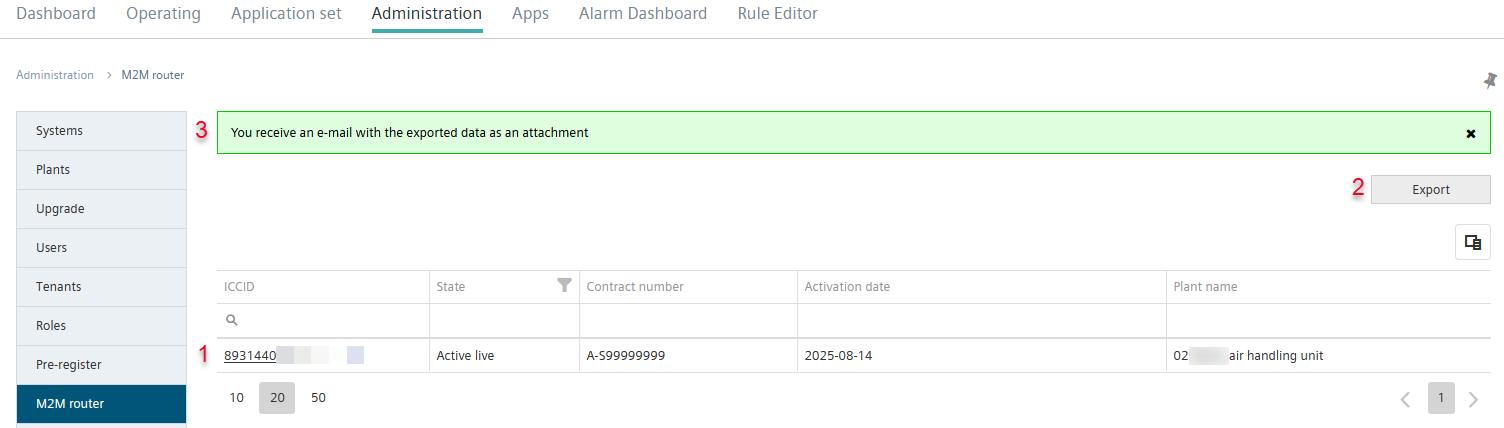
- Data from at least one SIM card are available for the last 12 months (1).
- Select "Export" (2).
- An e-mail with a .csv file is sent to the e-mail address stored in the Tenant:

- The .csv file includes the data in a worksheet.
- A corresponding confirmation displays in menu 'M2M router' (3).
Note on COV import from an exported .csv file
To ensure the data in the exported .csv file can be read during a COV import, perform the following steps in the .csv file:
- A csv file is exported from Climatix IC.
- The data in the .csv file is summarized in the first worksheet column.
- Separate the values displayed in the table with a comma (',').
- For example, use the function 'Data > Text to Columns' in Microsoft Excel.
- Perform this step for each row individually.
- Change the preset formatting of the 'ICCID & IMSI' worksheet manually to 'Text'.
- Save the modified .csv file.
- The COV import can be performed without loss of data.