Selecting one or more data points for display in Trend Viewer
The data points for display in Trend Viewer can be selected in the plant or in Trend Viewer. Proceed as follows when selecting data points for display in Trend Viewer:
- Rights are available for 'Trend Viewer'.
- Go to 'Apps > Trend Viewer'.
- The 'Data points' drop-down menu opens (5).
- Click '+Add new data point' (6).
- A new window opens to select plants and data points:
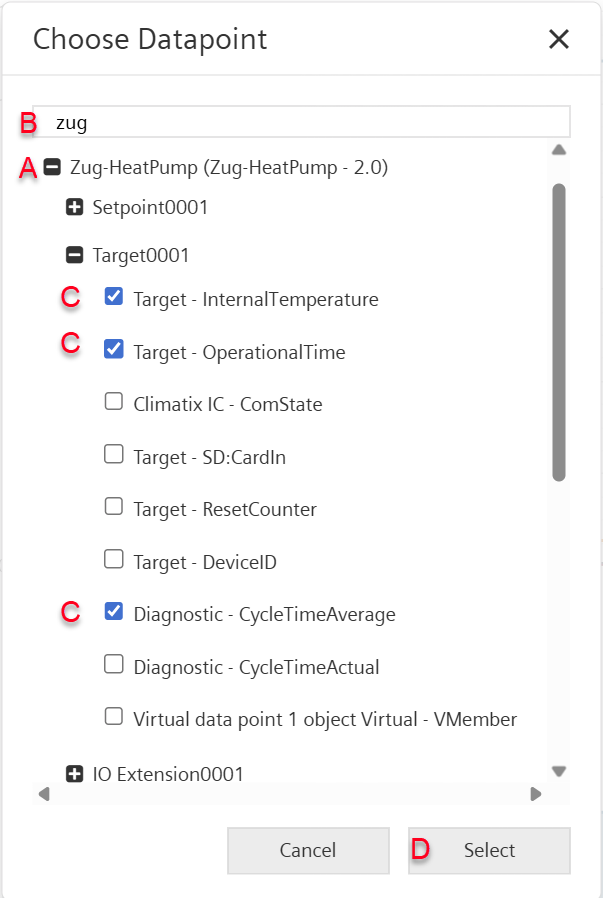
- Search for the plant from the drop-down list (A) or apply a filter (B).
- Select one or more plant data points (C).
- Click "Select” (D).
- The selected data point displays in Trend Viewer.
Note:
- Selecting new data points overwrites the original data point selection.
- Previously selected data points must be selected again.
- Previously selected data points must be individually deleted (see section 'Deleting a data point or axis in Trend Viewer').
- Multiple data points cannot be deleted.