Advanced filter search by plants with an alarm
Tenants can have a high number of integrated plants. The plants can have numerous different alarms. In turn, this results in a large number of entries.
Climatix IC offers various filter options by attributes to maintain a good overview with such large amounts of entries for plants and alarms. It reduces the amount of displayed entries to a workable amount.
- Go to 'Alarm Dashboard > Alarms > Plants'.
- Alternative: Go to 'Alarm Dashboard > Alarms > Active Alarms'.
- Click ' 'Filter by...'
- A new dialog window 'Advanced Filter Search' opens:
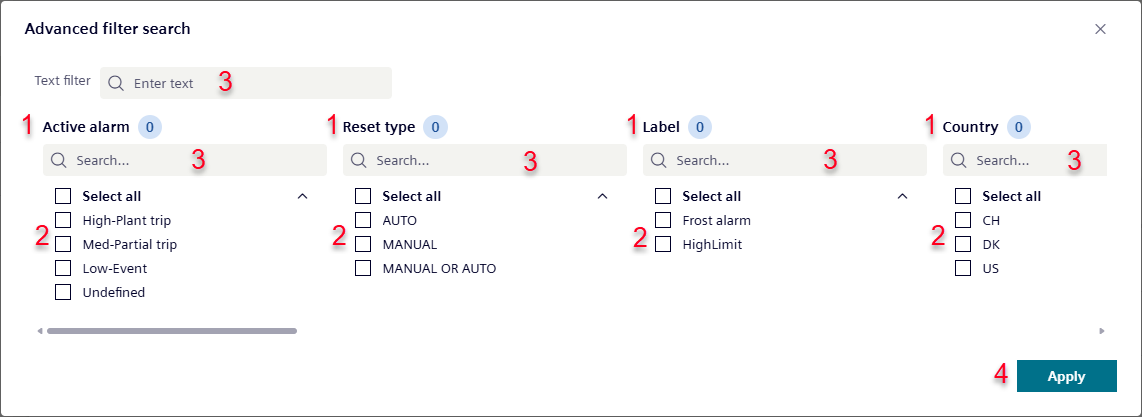
- Select the desired attributes (2) in one or more or the available filter categories (1).
- Multiple selections are possible.
- Alternative: Enter the attribute to filter in the free text fields (3).
- You can combine attributes in free text fields and entries in filter categories.
- Click 'Apply' (4).
- The 'Advanced Search' closes.
- The list of displayed plants and alarms are filtered by the previously entered or selected attributes.