Inherit Main-Tenant application sets to the Sub-Tenant
Visible for Sub-Tenants
With the selection "Visible for Sub-Tenants", all Sub-Tenants "inherit" an application set. You can use it to organize central management of application sets.
Inherit: Application set and roles as a package
Since the roles are mapped to the application set for a tenant (see the following illustration), the application set and roles are inherited as a Packet to the Sub-Tenant during 'Inherit'.
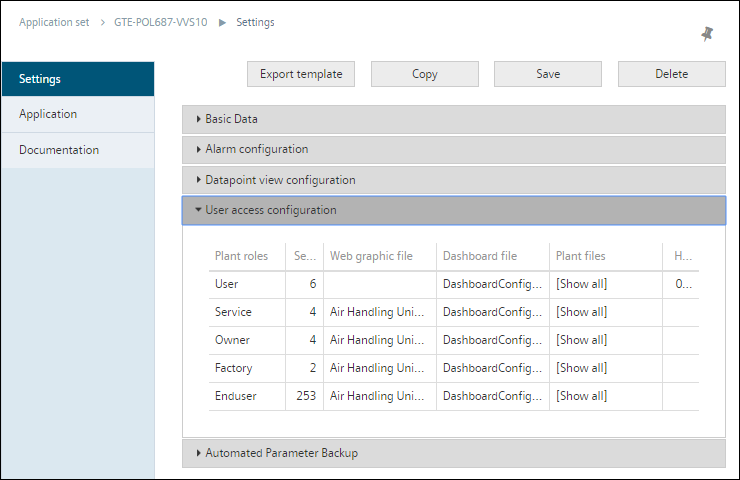
None of the settings and data links illustrated in the graphic can be changed by the Sub-Tenant. Conversely, the Sub-Tenant benefits from a central management of the "packet".
Differentiation
We distinguish between the following cases when packaging a Main-Tenant application set:
- When assigning a plant, use only "Inherited user roles of Main-Tenant". In this case, Climatix IC can calculate the data point access rights on how this operates on the Main-Tenant level or Sub-Tenant level without inheriting from one level to the other.
- Use original roles from the Sub-Tenant when assigning a plant that uses an inherited application set. In this case, all original Sub-Tenant roles must be mapped to Main-Tenant roles. This is solely intended to clarify the data point access rights within the package.
Framework and limits to mixing Main-Tenant and Sub-Tenant roles
- You benefit from centralized data management when using inherited application sets and original roles in Sub-Tenant while being able to define original Sub-Tenant roles.
- Only when it comes to accessing data points, Sub-Tenant roles are mapped to an existing Main-Tenant role to access the data points.
- Only the Main-Tenant role of owner can be mapped onto the Sub-Tenant role owner.
Procedure
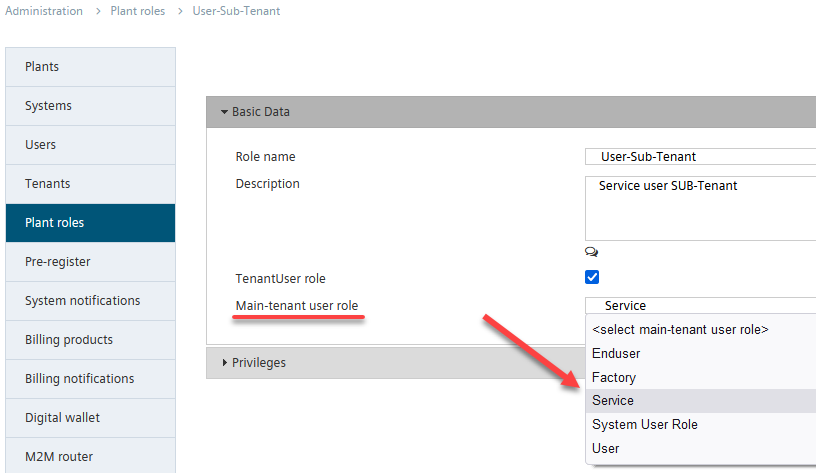
To map the Main-Tenant data point access rights to a Sub-Tenant role, select in "Administration > Roles > [Roles] > area: Basic Data > Main-Tenant user role" the Main-Tenant role with adequate access rights to data points that may apply to the particular Sub-Tenant role.
Visible for Sub-Tenants
With the selection "Visible for Sub-Tenants", all Sub-Tenants "inherit" an application set. You can use it to organize central management of application sets.
Inherit: Application set and roles as a package
Since the roles are mapped to the application set for a tenant (see the following illustration), the application set and roles are inherited as a Packet to the Sub-Tenant during 'Inherit'.
None of the settings and data links illustrated in the graphic can be changed by the Sub-Tenant. Conversely, the Sub-Tenant benefits from a central management of the "packet".
Differentiation
We distinguish between the following cases when packaging a Main-Tenant application set:
- When assigning a plant, use only "Inherited user roles of Main-Tenant". In this case, Climatix IC can calculate the data point access rights on how this operates on the Main-Tenant level or Sub-Tenant level without inheriting from one level to the other.
- Use original roles from the Sub-Tenant when assigning a plant that uses an inherited application set. In this case, all original Sub-Tenant roles must be mapped to Main-Tenant roles. This is solely intended to clarify the data point access rights within the package.
Framework and limits to mixing Main-Tenant and Sub-Tenant roles
- You benefit from centralized data management when using inherited application sets and original roles in Sub-Tenant while being able to define original Sub-Tenant roles.
- Only when it comes to accessing data points, Sub-Tenant roles are mapped to an existing Main-tenant role to access the data points.
- Only the Main-Tenant role of owner can be mapped onto the Sub-Tenant role owner.
Procedure
To map the Main-Tenant data point access rights to a Sub-Tenant role, select in "Administration > Roles > [Roles] > area: Basic Data > Main-Tenant user role" the Main-Tenant role with adequate access rights to data points that may apply to the particular Sub-Tenant role.