'Suppression log' window
All actions taken to suppress alarms are logged in a history at the plant level. Complete the following steps to view the log of alarm suppressions performed on a plant:
- The tenant has at least one plant with an alarm.
- Go to 'Alarm Dashboard > Alarms > Plants > [Plant with alarms to be suppressed]'.
- Click 'Suppress alarms'.
- A new 'Alarm settings' window opens.
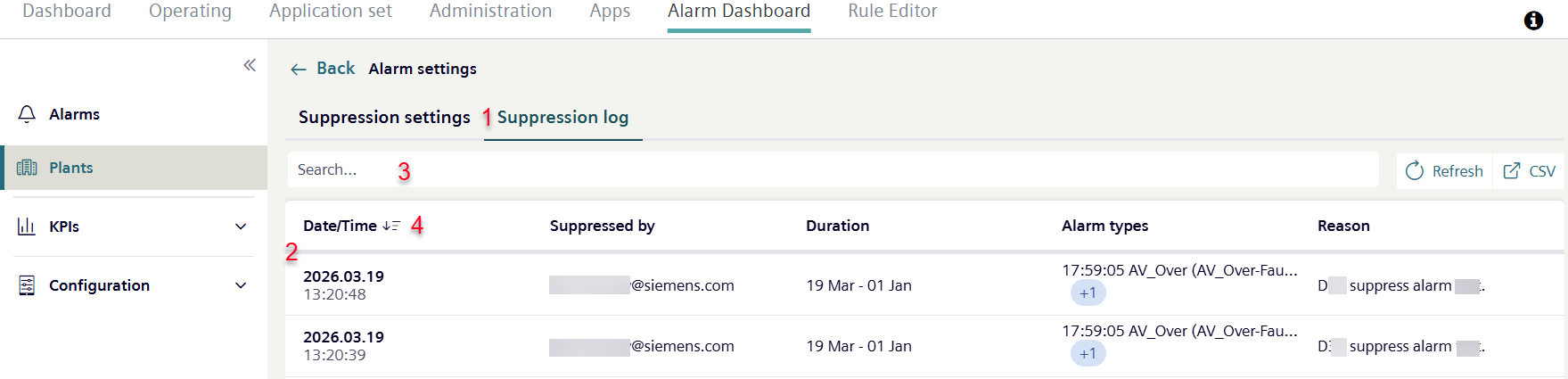
- Go to 'Suppression Log' (1).
- A new window opens, displaying a log of all actions taken so far in the plant to suppress alarms.
- The plant displays the time the alarm was suppressed, the user, duration of the suppression, mode and reason for suppressing the alarms as provided by the user (2).
- You can filter the entries in the search field (3) and sort in ascending or descending order using the table headers (4).