Testing
Pre-designed templates for report generation can be tested in advance on the desired plants. The goal is to determine whether the template acquires the data to generate the report and represents it correctly. Once satisfied, you can load the template to the plant or the application set to generate reports for the plant.
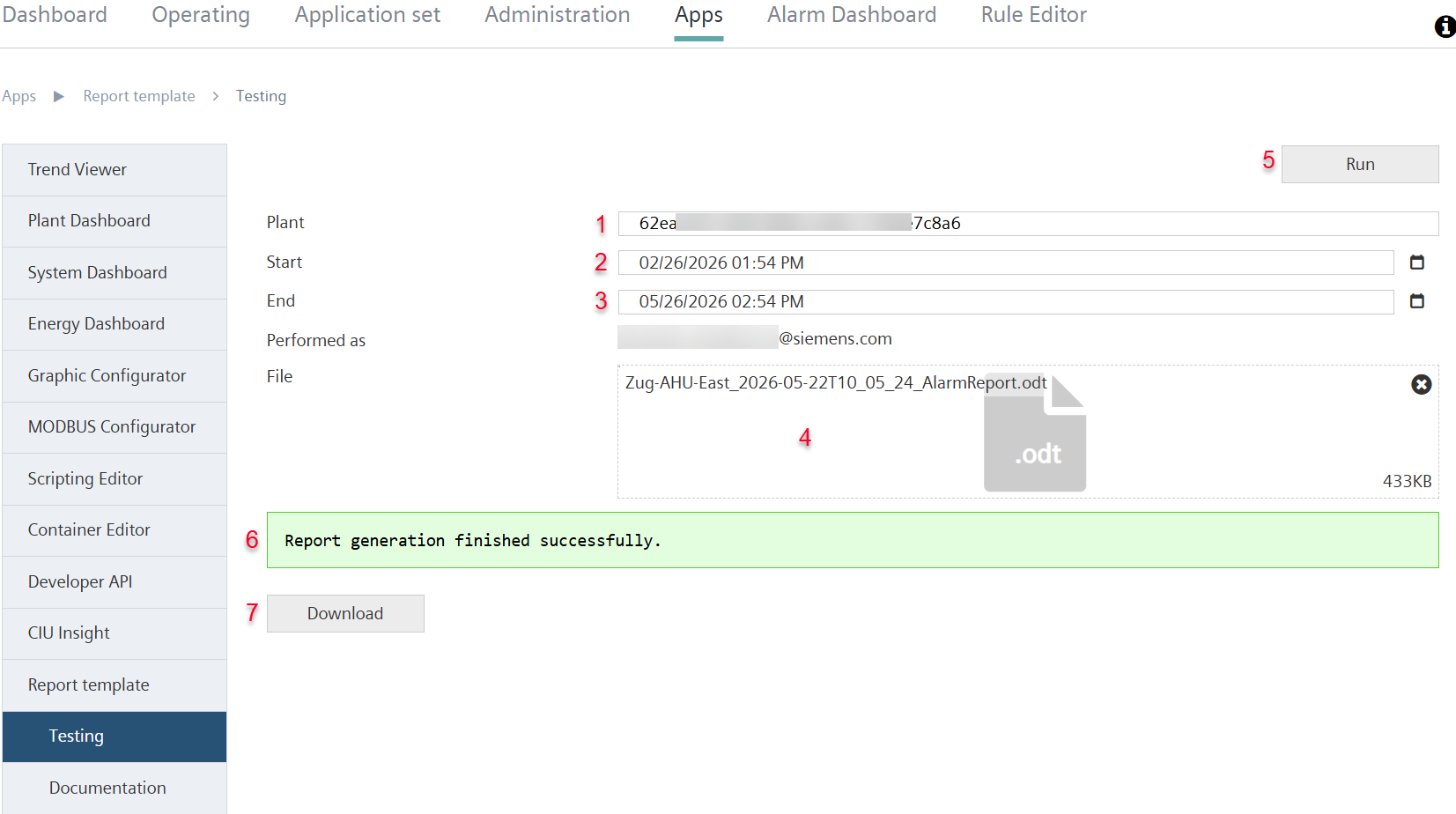
- The necessary user privileges are in place (see Report template').
- A report template is generated and available in .odt file format.
- Go to 'Apps > Report template > Test.'
- From the drop-down list, select the plant to test the report template (1).
- Set the time period from which the plant data is used for the test:
- Start date (2).
- End date (3).
- Drag the .odt file containing the report template to the field (4)
- Or click the field (4).
- A new pop-up window opens to select the file from a folder on your computer.
- Select 'Run’ (5).
- The uploaded .odt file is tested in the background and a success message display (6).
- The 'Download' button is enabled (7).
- Select 'Download’ (5).
- The tested .odt file with the template is saved on the local computer in the specified default download location.