Fast login with existing account
The workflow to log into Climatix IC is as following once the account is setup:
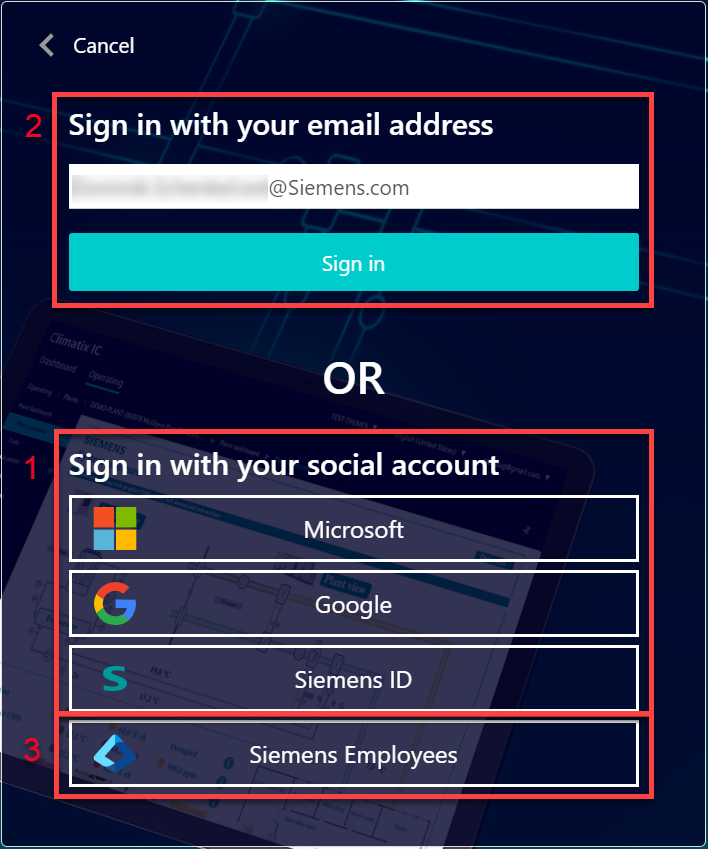
Log in via social provider
- Go to the Climatix IC landing page: www.climatixic.com.
- Set the cookies (See 'Register via e-mail invitation').
- Click "Register".
- A mask opens to select the social providers.
- Click your social provider (1):
- Microsoft (private account)
- Google (private account)
- SiemensID (not for Siemens users)
- Log in at an external identity provider.
- Enter local Climatix IC password once for verification and linking to the account.
- Complete login.
- The login is successful and the Climatix IC landing with dashboard opens.
Log in as Siemens employee
- Go to the Climatix IC landing page: www.climatixic.com.
- Set the cookies (See 'Register via e-mail invitation').
- Click "Register".
- Option 1: Enter e-mail address and click login (2).
- You are automatically forwarded to the Siemens Entra ID login.
- Option 2: Click "Siemens employees" (3).
- Login is automatic via Siemens Entra ID.
- The Climatix IC with dashboard opens.
Secure login and out
Note the following functions for login/out:
- 30 minute session timeout: The connection automatically ends after 30 minutes of inactivity. The web page returns to the Login screen.
- The user account is locked for 60 seconds after 6 attempts with the wrong password.
- Additional attempts only extend the lockout.
- Microsoft 'Smart Lockout' is used here.
- For security reasons, a new login is required after 24 hours of uninterrupted user activity.