CIU Insight
The 'CIU Insight' function (CIU↑ = Cloud Item Update) analyzes data consumption. Data consumption in the Tenant↑ is billed directly and is therefore a cost factor. As a consequence, it is important to keep an eye on data consumption at the Tenant so that countermeasures can be taken if data consumption is too high.
CIU Insight offers a quick, graphic overview of the Traffic↑, within an application set (see 'Application sets menu') or within an individual Plant↑. The overview helps determine:
- Which plants produce how much traffic at the Cloud item↑ level?
- Which plants produce how much traffic at the cloud at the Cloud item↑ level?
- For information on Cloud items (VCIs or VCPs): See 'Virtual cloud data points VCI and VCP'.
- Which application sets or plants produce too much traffic and therefore may may require adjustments?
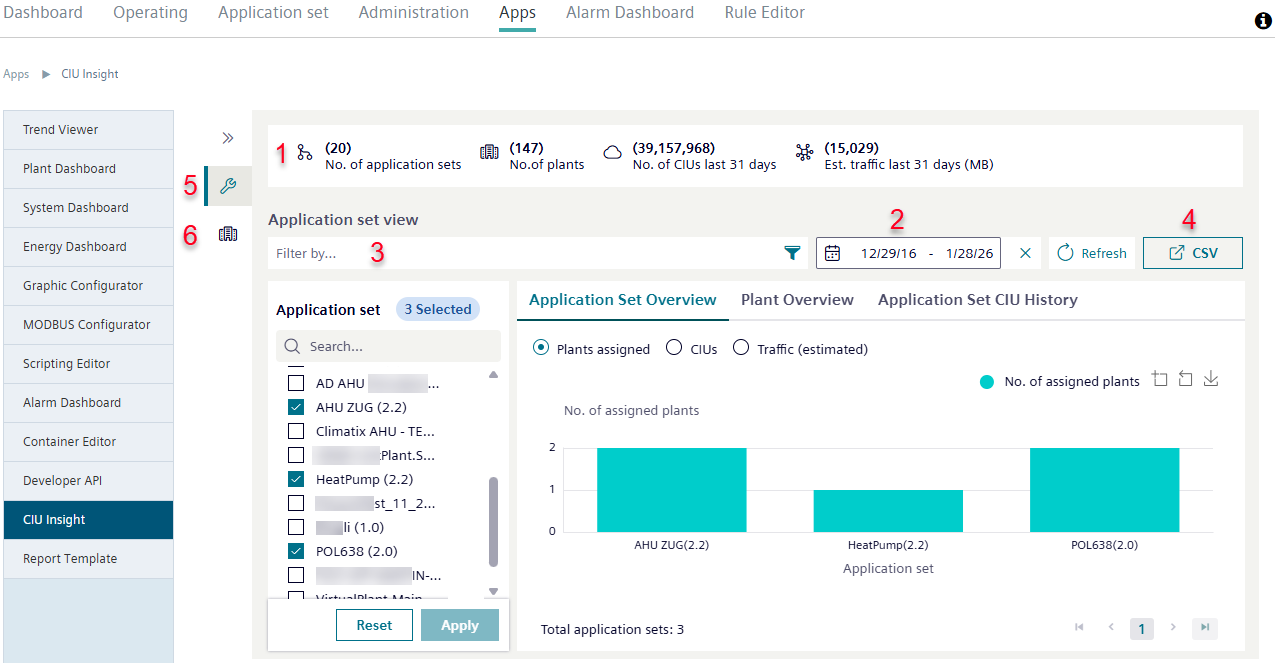
Initial basic information on the data volumes at the Tenant and the applications sets, plants, and CIUs↑ that cause the traffic is displayed in the header for the function (1).
Operation
Data displayed in 'CIU Insight' can be filtered by time period (2), plant type (3), or M2M↑ router (3). Menus and control of the various functions are the same as in 'Alarm Dashboard menu'.
Data from 'CIU Insight' can be exported as a .csv file (4).
Application sets and plants have their own views:
- View 'Application set' (5)
- 'Plants view' (6)

The 'CIU Insight' function is currently available on request. If 'CIU Insight' is activated in the Tenant↑ by the Tenant-Administrator↑, then all users with the corresponding access rights can use the function.