Events
Events↑ in Climatix IC are incidents that are saved to the Climatix IC database. Events are measurable operations in Climatix IC such as when a value exceeds or drops below a set threshold but not significant enough to display as an Alarm↑ to a user. Events generally do not require the immediate intervention by the user.
Events can occur on both individual plants↑ as well as in Systems↑.
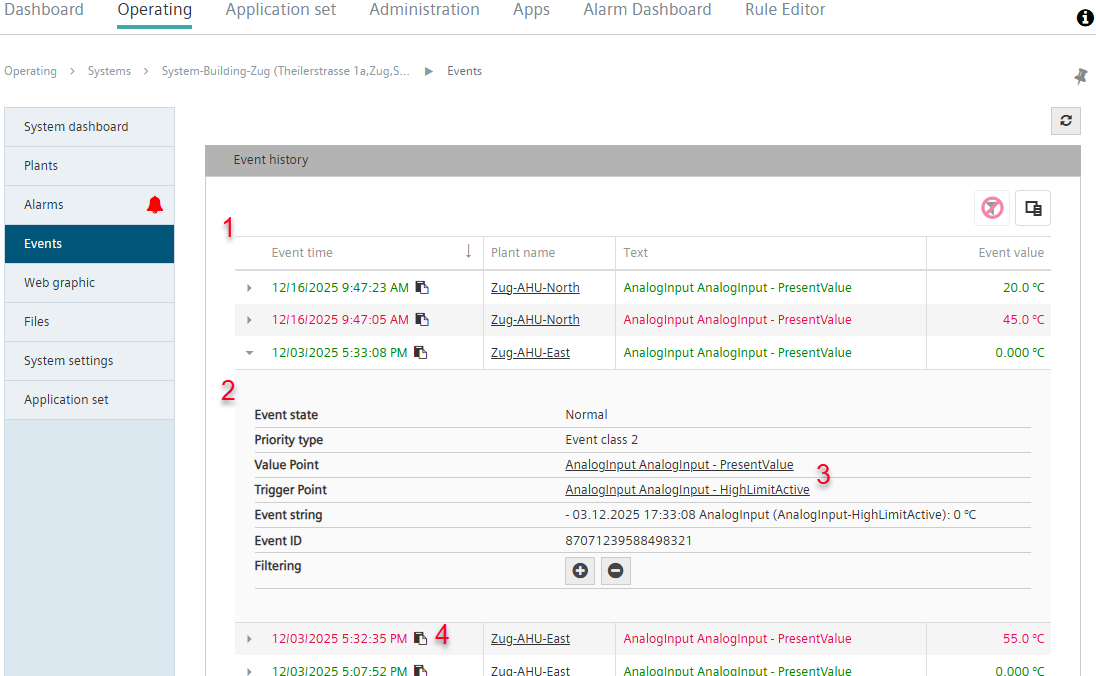
Past events are displayed in menu 'Events' in a history with timestamp, plant or system name, explanation and event value.
- The right 'Plant / Events' is assigned in the user role (see 'Roles').
- The current BSP↑ is used (on POL6x8 controllers, a minimum of BSP version 11.78).
- Go to 'Operation > Systems > [My system] > Events'.
- Or: Go to menu 'Operation > Plants > [My plant] > Events'.
- A new view 'Event history' opens.
- The event history lists the events logged in the system or plant (1).
- Click an event (2).
- A drop-down menu opens.
- It displays information on the event.
- Click on one of the underlined data point designations (3).
- Climatix IC goes directly to the data point within the system or plant (see 'Data points').
- Click the symbol '
 ' (4).
 - The event's timestamp is copied to the clipboard.