Summary of subscription periods for plants
A Tenant-Administrator can quickly view plant subscriptions in the tenant.
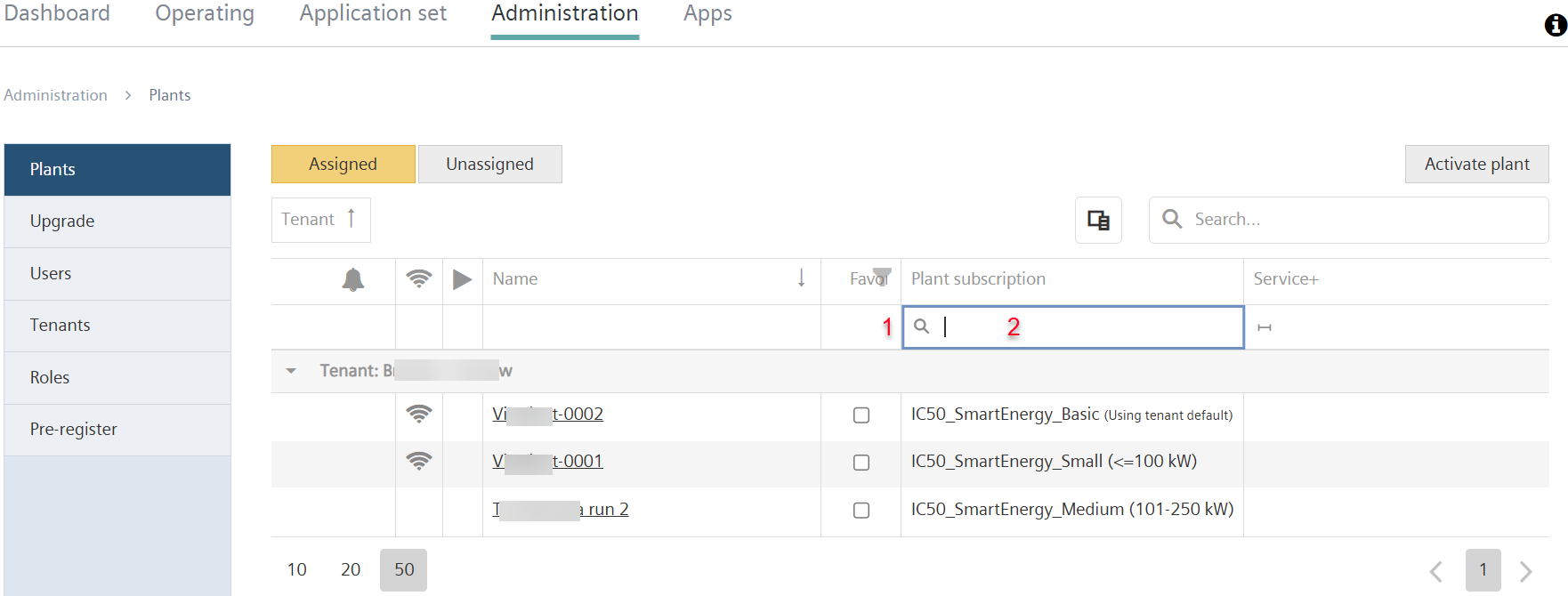
- The own role is 'Tenant-Administrator’.
- Go to 'Administration > Plants'.
- Click "Column selection"
 .
. - Drag the "Subscription" entry to the table header. (See also chapter "Search, sort, group").
- A new column 'Subscriptions' displays with a list of the plants with valid subscriptions.
- In the 'Subscription' column, move the cursor over the (1).
- A new drop-down menu opens:
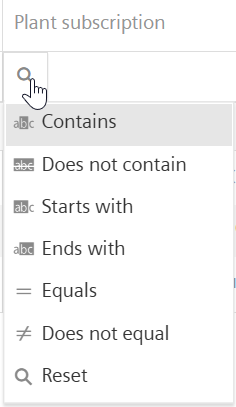
- The menu lists all available filter criteria that can be used to filter subscriptions.
- In the menu window, select the desired filter criterion.
- In the free-text field (2), enter a text for filtering.
- The subscriptions for the plants in the tenant are listed by the specified filter criteria and text.

>The subscription status and term of subscription are also included in the monthly billing statement (see 'Billing - Payment model 'Post-Pay'').